
Migrate a WordPress Site Using the "All-In-One Migration Plugin"
This article goes over the steps for migrating a WordPress website to WordPress hosting through your FG Funnels account using .wpress exports via All-in-One Migration plugin. This option is great if you have access to a .wpress file, or you're migrating from a backup.
⚠️Important: This option does not support incremental updates. It overwrites the target site completely.
How to Use
Part 1: On the source WordPress site:
- Install and activate the All-in-One WP Migration plugin.
- Export the website to a .wpress file.
Part 2: In FG Funnels:
Step 1: Navigate to Your Site Settings
First things first, go ahead and click on the WordPress option on the left side menu. This will get us on the right path to creating your new home for your existing site.

Step 2: Activate WordPress
Look for and click on Activate WordPress. Just like switching on the lights in a new house, we're getting things ready for your arrival.

Step 3: Set Up Your Site
Click on the WordPress site card, select From blank, then choose a template. Select From blank again, click Create, fill out your site's details, and finally hit Create WordPress site.


Step 4: Import Your Existing Site
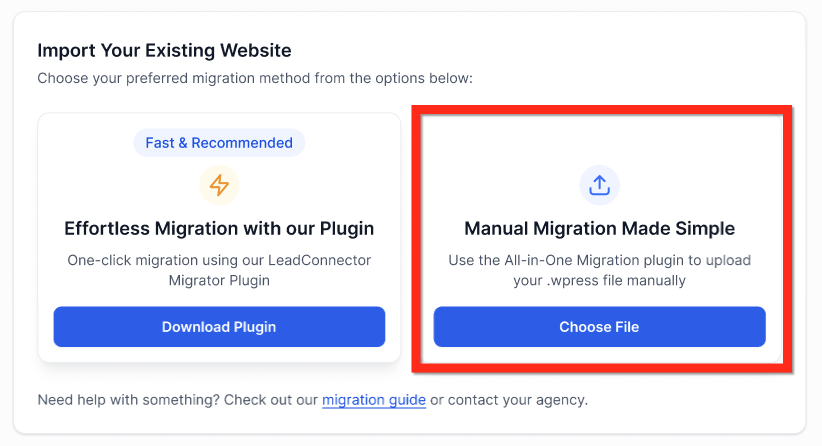
You'll be on the "Info" tab by default —> Scroll down to the section labeled "Import Your Existing Website"
Step 5: Grab the Plugin
Click Get Plugin, then hit Download. Alternatively, if you’re already on your WordPress dashboard, navigate to Plugins, search for "All-In-One Migration Plugin", and select it. Whichever is easiest!
Step 6: Export Your Site
Within the plugin, click Export Site, then choose Export to and select File. Now, just download that file and keep it safe; think of it as your website's suitcase packed and ready to go!
Step 7: Upload to FG Funnels
In your FG Funnels WordPress site dashboard, click "Choose File" and upload the .wpress file (Max: 2GB). Sit back and relax while the upload completes.
Step 8: Request Migration
Almost done! Click Request for Migration. Grab a coffee while the migration process completes; the system will handle the heavy lifting from here. Once done, the site will auto-deploy with all content from the exported file.
⚠️Important: This option does not support incremental updates. It overwrites the target site completely.