
Affiliate Portal
Note: Your screen may look different from this article if your account has the new FG Funnels menu design turned on. Learn why and how to switch back.
The Affiliate Portal inside the client portal gives your affiliates one place to see their campaigns, track their results, and grab their referral links. Affiliates can see key numbers like clicks, leads, customers, and commissions, review each campaign's commission terms, and personalize their referral links.
In this article
Open the Affiliate Portal
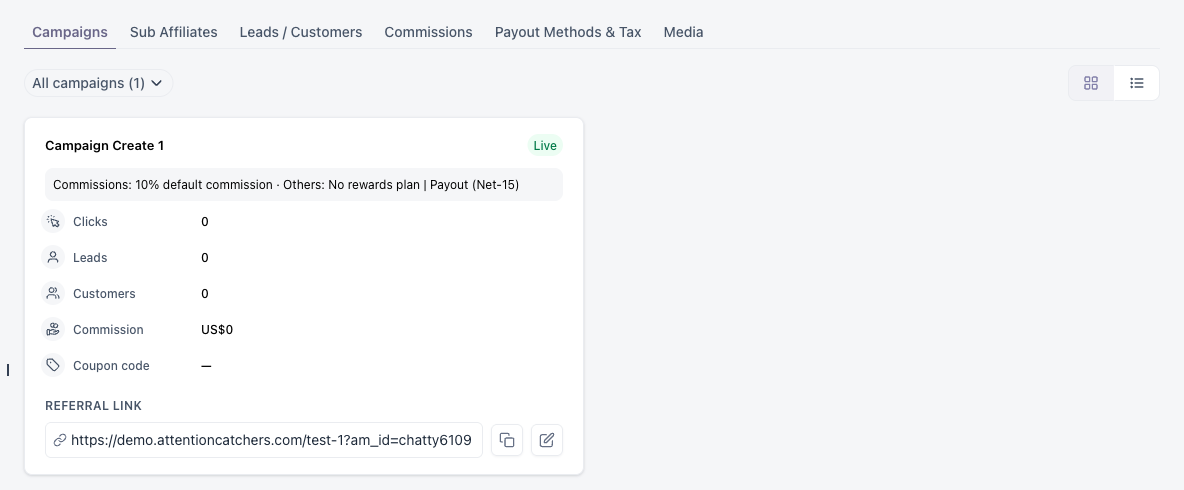
Affiliates log in to the client portal and click Affiliates in the left sidebar. The Campaigns tab lists every campaign they've been added to.
Use All campaigns to filter to one campaign, and the icons on the right to switch between card view and list view. The other tabs are Sub Affiliates, Leads / Customers, Commissions, Payout Methods & Tax, and Media.
What Affiliates See on Each Campaign
Each campaign card shows:
- Campaign settings: a summary of the default commission, any rewards plan, and payout terms (for example, Net-15).
- Key numbers: Clicks, Leads, Customers, and Commission, so affiliates can track how they're doing.
- Coupon code: if the campaign has one.
- Referral link: the full link to share, with a button to copy it.
Customize a Referral Link
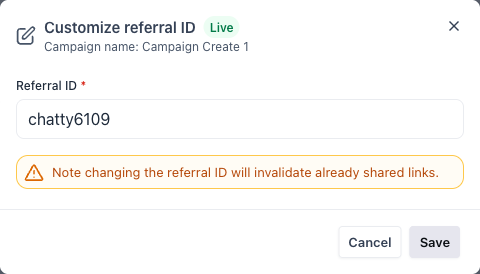
Affiliates can personalize the end of their referral link with their own referral ID.
- Click the edit (pencil) icon next to the referral link.
- Enter a new Referral ID.
- Click Save.
⚠️ Note: Changing the referral ID will invalidate links that have already been shared.
Leads, Customers, and Churned
- Leads: people who opted in through a regular name-and-email form, or filled out the first step of a two-step order form, after clicking the affiliate's link.
- Customers: leads who bought the offer using the affiliate's link.
- Churned: for subscription cancellations, you can choose to pay commissions 15, 30, or 60 days after the sale. This gives you time to deny a commission if the subscription is canceled. Once canceled, the lead moves to Churned. It can be reactivated later by starting another checkout or re-enrolling them in Stripe.