
How to Use Ask AI Split View in FG Funnels
Your screen may look different from this article if your account has the new FG Funnels menu design turned on. Learn why and how to switch back.
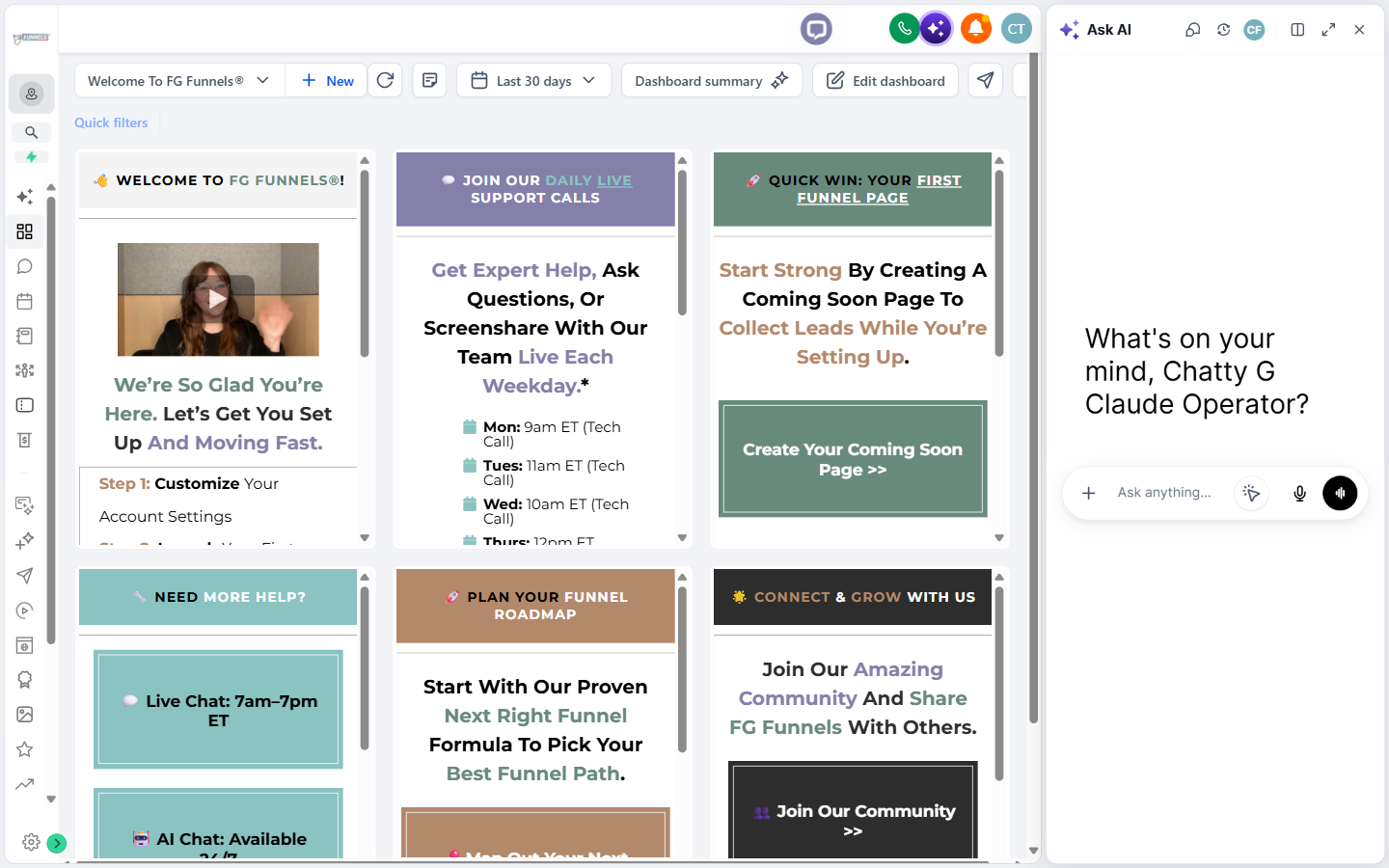
Ask AI Split View gives you a side-by-side workspace for using Ask AI while keeping the FG Funnels page you're working on visible and interactive. Instead of the Ask AI panel floating over your content, you can dock it beside supported pages and keep navigating or working while you chat.
In this article
What Is Split View in Ask AI?
Ask AI Split View is a docked view that places the Ask AI panel beside your FG Funnels workspace. It's designed for times when you want to reference or interact with the current page while using Ask AI.
When Split View is on, the FG Funnels page stays visible and clickable while you chat. You can navigate the page, review information, and keep working without closing Ask AI or having the floating panel cover the content you need to see.
Your Split View preference is also remembered as you move around FG Funnels. If you go to a screen where Split View isn't currently supported, Ask AI switches to its floating view. When you return to a supported screen, your Split View preference is restored automatically.
Key Benefits of Split View in Ask AI
- Work side by side: Keep Ask AI and your FG Funnels workspace visible at the same time.
- Keep your page accessible: Keep clicking, scrolling, and interacting with the FG Funnels page while chatting with Ask AI.
- Reduce interruptions: Skip repeatedly opening, closing, or moving a floating Ask AI panel to see the content underneath.
- Keep your preferred view: FG Funnels remembers your Split View preference as you move between supported and unsupported screens.
Where Split View Is Available
Split View is currently supported in these areas:
- Agency Dashboard
- Agency Launchpad
- Sub-account Dashboard
- Sub-account Launchpad
- Calendars
- Calendar view
- Appointments
- Troubleshoot
- Calendar Settings
- Preferences
- Availability
- Connections
- Services
- Rentals
When you go to an unsupported screen, the Open split view option is hidden and Ask AI opens as a floating panel. Your Split View preference isn't lost. When you return to a supported screen, Split View comes back on its own.
Note: Split View availability only affects whether Ask AI can be docked beside the page. Page element selection and automatic page context can also work with the floating Ask AI panel when a host page is available.
How to Turn on Ask AI Split View
- Log in to FG Funnels and go to a screen that supports Split View.
- Open Ask AI by clicking the button in the upper-right corner.
- In the Ask AI panel header, click Open split view.
- Ask AI docks beside the current FG Funnels page. Keep interacting with the page while you ask Ask AI questions or give it instructions.
- To return to the floating panel, click Close split view in the Ask AI panel header.
Frequently Asked Questions
Why don't I see the Open split view option?
The page you're viewing may not currently support Split View. On unsupported screens, the Split View control is hidden and Ask AI uses its floating panel instead.
Do I have to turn on Split View again when I return to a supported screen?
No. If Split View is your saved preference, Ask AI automatically returns to the docked layout when you go back to a supported screen.
Can I keep working in FG Funnels while Split View is open?
Yes. The FG Funnels page stays visible and clickable while Ask AI is docked beside it.
Does page element selection require Split View?
No. Page element selection is an Ask AI capability and can also work with the floating Ask AI panel where a host page is available.
Does Split View have page context?
Yes. Ask AI can use page context while Split View is open, including page element selection and automatic page context on supported host pages. These capabilities aren't limited to Split View and can also work when Ask AI is open as a floating panel.