
How to Change a Section's Width
In the FG Funnels funnel and website builder, sections span the full width of the page by default. You can make any section narrower with its Width setting, which is useful for keeping text blocks readable or creating a centered, boxed-in look.
Section Width Options
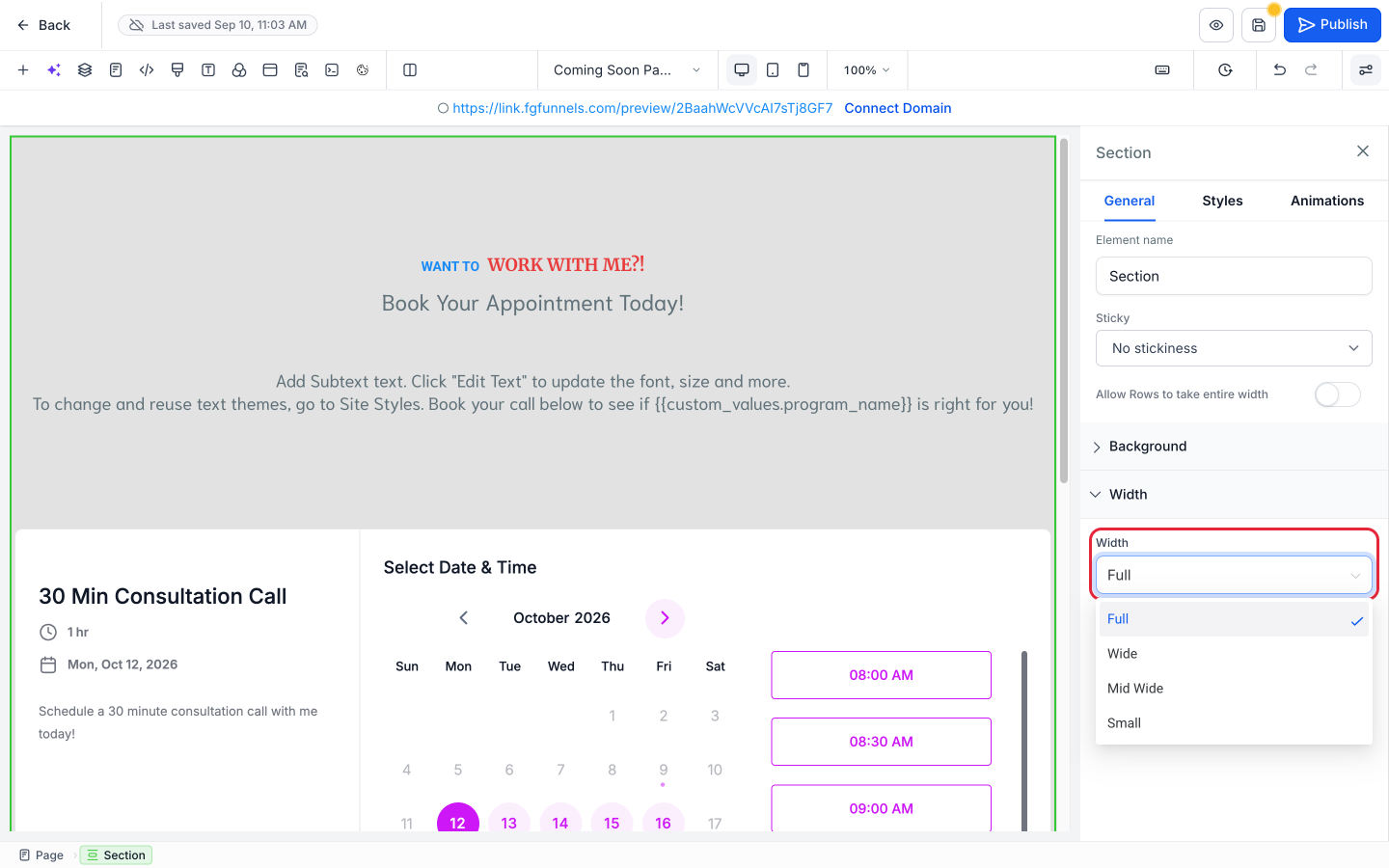
Every section has four width options:
- Full (the default): spans the full width of the page.
- Wide
- Mid Wide
- Small
The options get progressively narrower from Full to Small.
How to Change a Section's Width
1. Select the section
Click anything inside the section, then click Section in the breadcrumb along the bottom of the builder. The section gets a green outline and its settings open in the side panel.
2. Choose a width
In the section's General tab, find Width and choose Full, Wide, Mid Wide, or Small.
3. Save and check
Click the Save icon (the disk icon at the top right of the builder), then check the section on desktop, tablet, and mobile using the device icons in the toolbar.
Section Is Full Width but the Content Isn't?
A section can be set to Full while the row inside it still stops short of the edges. That's controlled by a separate section setting, Allow Rows to take entire width, which is off by default. See Why Isn't My Row Full Width?