
How to Invite Members to Your Community Group by Email
Still on the classic look? If your community hasn't moved to the new experience yet, see Moving to the New Client Portal Experience.
Send a personal invite straight to someone's inbox. People you invite by email are approved automatically, even in a private group. Group owners and admins can send email invites.
Important: Don't use email invites for a paid group. Invited members skip the checkout, so they won't set up a payment or subscription. Share the group link instead (see Paid Groups).
In this article
How to Send an Email Invite
1. Open your group
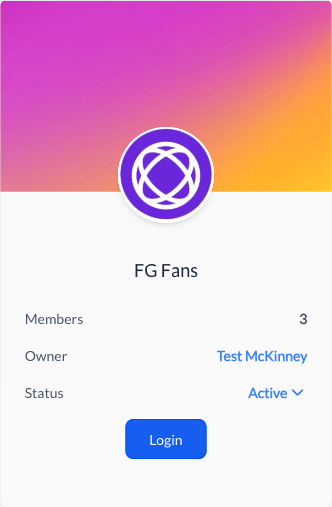
Go to Memberships > Communities > Groups, then click Login on the group. The group opens in a new tab.
2. Click Invite Members
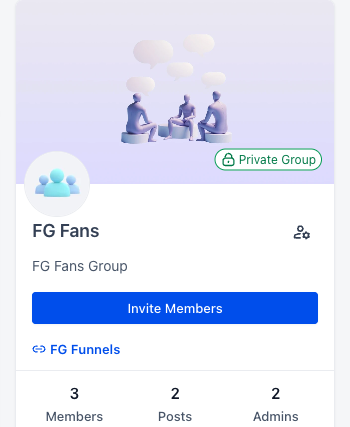
You'll find Invite Members in the group card on the right side of the page.
3. Fill in their details
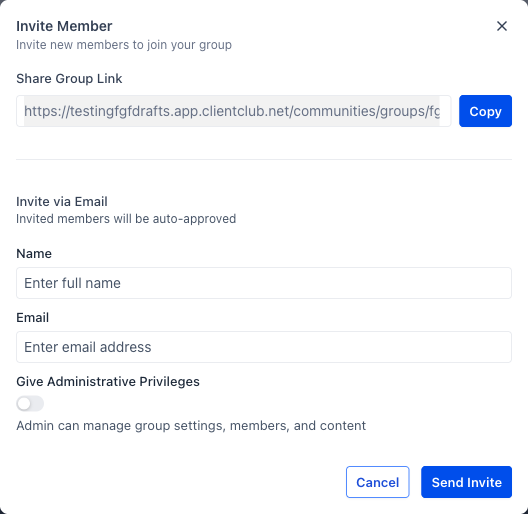
In the Invite Member window, under Invite via Email, enter the person's Name and Email.
4. Choose whether to make them an admin
Turn Give Administrative Privileges on if this person should be able to manage the group's settings, members, and content, such as a team member or service provider. Leave it off for a regular member.
5. Click Send Invite
They'll get an email with a button to join the group.
What Invited Members Will See
The invite email has an Accept Invite button. What happens next depends on whether they already have an account.
- New to your client portal: they're taken to a page to set a password, then signed in to the group.
- Already a member: they're signed in to the group automatically.
Note: The invite expires after 30 days. If they don't accept in time, send a new invite.
Frequently Asked Questions
Who can send email invites?
Group owners and admins.
Can I customize the invite email?
No. The invite email uses a standard message that can't be changed.
I sent an invite, but they haven't joined yet. Can I resend it?
Yes. Send the invite email again, or share the group link.
I have a big list of people to invite. Can I invite them all at once?
Yes. Send an email or SMS campaign that includes the group URL, so everyone on your list can find the group and join.